

Introduction
I have tested dozens of AI chatbots. Most of them are glorified FAQ pages with a chat window. You ask a question, they give you a canned answer, and if you push back, they break.
So when I heard about CueVue—a platform that claims to put a photorealistic AI representative on your website that visitors can actually talk to in real time—I was skeptical. I have heard “human-like AI” promises before. They rarely deliver.
But this time was different. CueVue’s team gave me access to their fully interactive demo, and I spent time inside it. I picked an avatar. I configured it for a real business scenario. And then I talked to it.
This CueVue review is based on my actual hands-on experience with the live demo. I tested the full workflow: avatar selection, role configuration, live conversation, and lead capture. Here is my honest breakdown.
The Launch Clock is Ticking: The cart opens on September 21, 2026, at 11:00 AM EDT and closes on September 26, 2026, at 11:59 PM EDT. The All Access Bundle at $147 is launch-only—after launch, the bundle is removed and the standard funnel returns at $455.
If you are new here, check out my Best AI Tools 2026 for more deep-dive AI buying guides.
Affiliate Disclosure
Full Transparency: This CueVue review contains affiliate links. If you click on one of my links and make a purchase, I will earn a small commission at no extra cost to you.
I do not let this influence my opinions—I tested the interactive demo extensively, and the pros and cons you read here are based on my actual hands-on experience. I only recommend products I have personally tested and believe deliver real value. Your trust matters more to me than a commission.
📋 CueVue Overview
What Is CueVue?
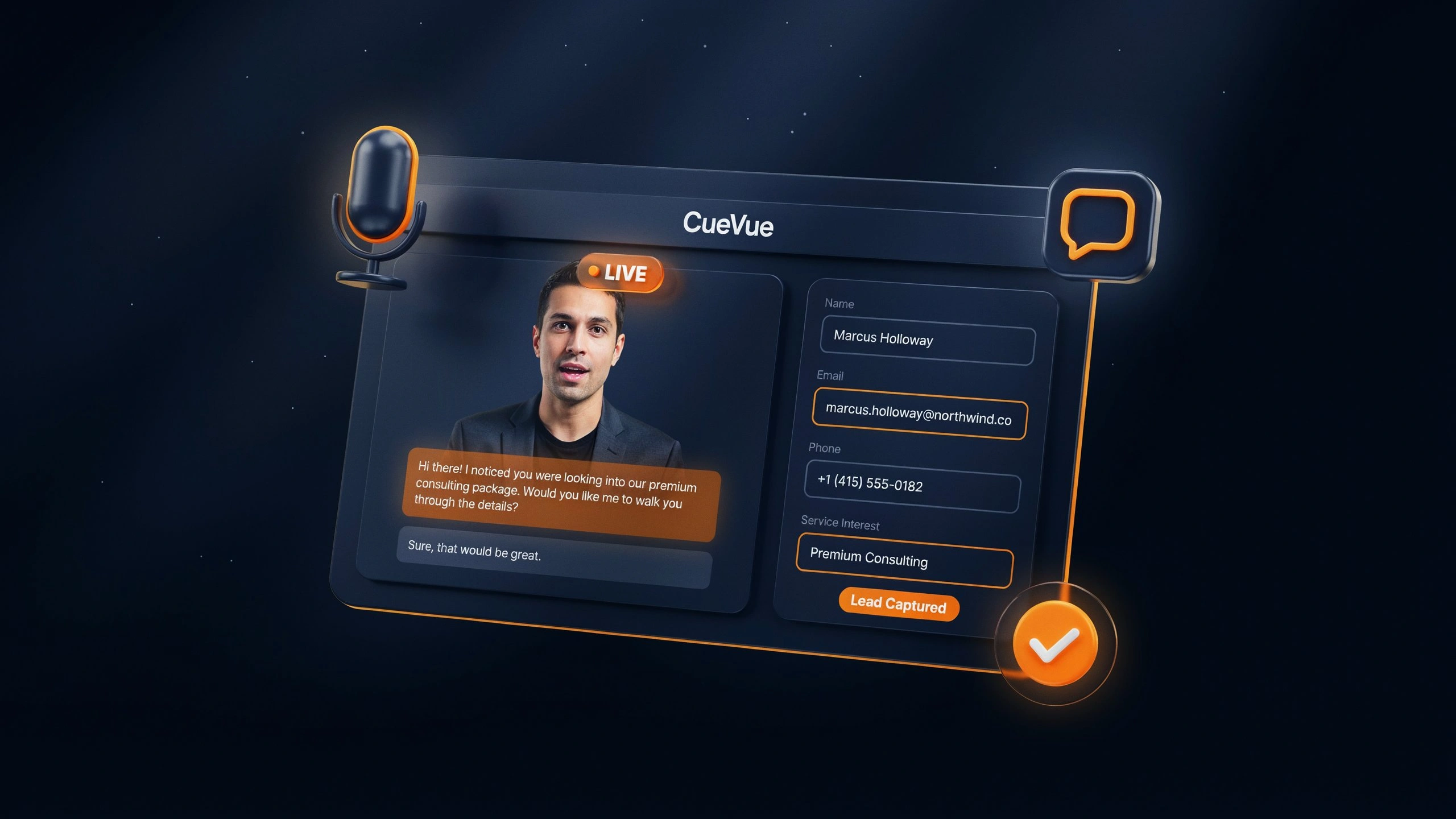
CueVue is not a chatbot. It is a LiveRep™—a photorealistic AI representative that visitors can actually speak with in real time.
The workflow in plain English:
- Pick a face—Choose from 10+ photorealistic presenters or build a custom avatar from your own face.
- Pick a role—lead capture, appointment booking, sell & convert, onboarding, testimonial collection, support, recruiting, or survey.
- Configure—Give it a business URL, and it learns the business. You review and approve.
- Talk to it—Visitors have real two-way conversations, including follow-ups and interruptions.
- It acts—captures leads, qualifies prospects, answers objections, books appointments, and handles support. Records, transcribes, scores leads, follows up, and integrates.
The tagline: “Chatbots chat. Avatars perform. LiveReps™ work.”
What It IS:
- A real-time conversational AI with photorealistic presenters.
- A business-specific knowledge engine—learns from a URL, buyer approves.
- A lead capture and qualification tool—fields populate as the visitor speaks.
- A commercial tool—agencies can sell it as a service.
What It Is NOT:
- NOT a chatbot—it handles natural conversation, interruptions, and follow-ups.
- NOT a canned video—it responds live, in real time.
- NOT a traffic source—it converts visitors you already have.
- NOT a full CRM—it integrates with tools like GoHighLevel.
What’s New in This Version
CueVue represents a significant evolution from earlier AI chat tools. Historically, if you wanted conversational AI on your website, you had to:
- Use a basic chatbot that could not handle follow-ups or interruptions
- Record canned videos that could not answer questions
- Manually qualify every lead
- Chase prospects who ghosted after filling out a form
What’s different with CueVue:
- Real two-way conversation—visitors ask questions naturally, including follow-ups and interruptions.
- Business-specific knowledge—feed it a URL, and it learns the business.
- Real action after conversation—recordings, transcripts, lead scoring, follow-up, integrations, and client reporting.
- All-in-one workflow—avatar selection, role configuration, live conversation, and lead capture in one dashboard.
Key Features Breakdown
1. Pick a Face—10+ Photorealistic Avatars
I started with Step 1: choosing an avatar. CueVue offers two engines:
- Avatar Engine 1 (Speak Out Loud) — 10 avatars that speak naturally
- Avatar Engine 2 (Type to Talk) — 12 avatars with different interaction styles
The avatars I could choose from included Amara, Mia, Gabriel, Bella, Finn, Sophie, Hunter, Julia, Liv, and Kevin. Each has a different look, background, and vibe—office, studio, boardroom, lounge, casual, warm, desk, home.
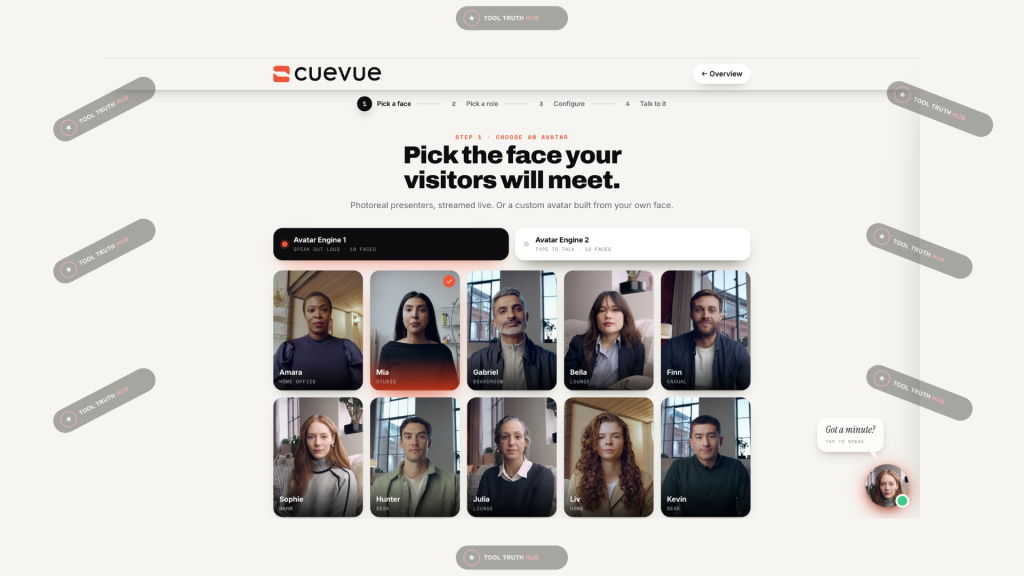
My take: The variety is genuinely impressive. Most tools give you one or two avatars and call it a day. CueVue gives you 10+ and lets you pick the one that fits your brand.
2. Pick a Role—8 Different Jobs
Step 2 is where CueVue starts to separate itself from every other AI avatar tool. You choose what the agent is for:
| Role | What It Does |
|---|---|
| Lead capture | Visitors → booked calls |
| Appointment | Pick a time on the spot. |
| Sell & convert | Recommend, then close. |
| Onboarding | First run, done right |
| Testimonial | Collect on camera. |
| Support | Face-to-face help |
| Recruiting | Screen before you call. |
| Survey & quiz | Ask, don’t email |
I tested the Lead Capture role because that is the highest-value use case for most businesses.

My take: This is not a one-trick pony. You can deploy the same avatar for different jobs. An agency could use lead capture for one client and support for another.
3. Configure—One-Click Setup
Step 3 is where CueVue gets serious. Once you pick the role, it configures everything automatically.
In my test, I set it up for Summit Roofing. Here is what it configured:
- “Where this fires”—”11pm after a hailstorm, a homeowner is putting a bucket under the hallway ceiling with three roofers’ sites open in other tabs.”
- Brain: Live—answers in real time, holds context
- Voice: Voice A (matched to Mia automatically — no gender to pick)
- Goal: Book Inspections
- Captures: Full Name, Email, Phone, Service Interest, Budget, Additional Details
- Deploys to: Landing page, Sidebar
- Calendar: Off
- Delivers to: GoHighLevel + SMS alert
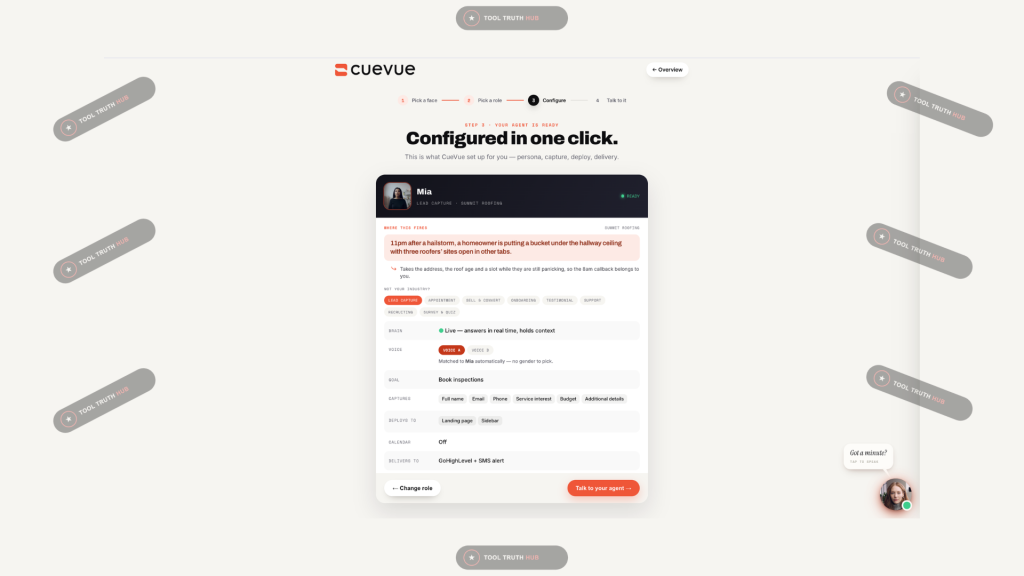
My take: The level of detail here is what sold me. Most tools give you a generic chatbot. CueVue gives you a fully configured agent with a specific job, specific questions, and a specific outcome. It took me under 2 minutes to go from picking a role to having a fully configured agent.
4. Talk to It—Live Conversation
Step 4 is where I put it to the test. I clicked “Start the conversation” and started talking.
The interface is split into two panels:
- Left: Mia (the avatar), with Live and Chat toggles, a live transcript option, and a timer.
- Right: The Lead Capture panel with fields for Full Name, Email, Phone, Service Interest, Budget, and Additional Details.
The note at the bottom says, “Fields land here the moment they’re spoken.”
I talked to Mia. I gave her my name. I said I had a roofing issue. I mentioned a budget. Each field populated in real time as I spoke.
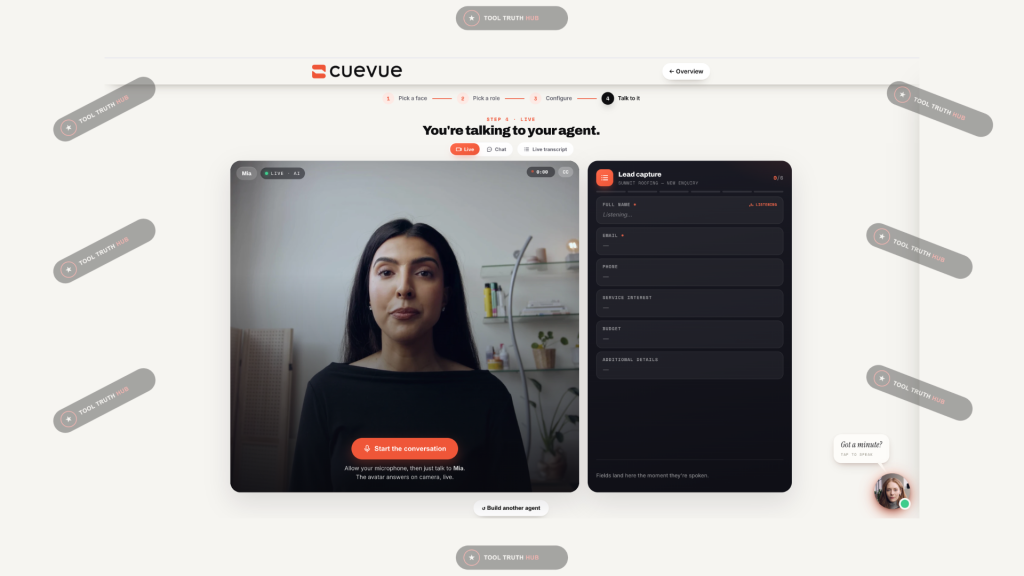
My take: This is the moment. CueVue won me over. The conversation felt natural. Mia handled my follow-up questions without breaking. The lead capture panel filled in as I talked. No forms. No “please enter your email.” Just a conversation that produces a qualified lead.
5. Real Action Afterward
CueVue does not just talk. It acts. After the conversation:
- Recordings and transcripts are saved.
- Lead scoring is applied
- Follow-up can be automated
- Integrations push data to GoHighLevel, SMS, and other tools
- Client reporting is available for agencies
6. Agency Launch Kit (Mega Bundle)
The Mega Bundle includes a full Agency Launch Kit:
- Agency website—built and ready to point a domain at
- One-pagers—leave-behinds and attachments per niche
- Outreach—prospect-demo sequence
- Use-case playbooks—what an avatar does in each niche
- Implementation guides—setup walkthroughs
- Ad creative—written and designed, ready to run
- Email sequences—for your own list
- Client presentation decks—niche-specific pitch decks
- Commercial templates—proposals, scopes, pricing, onboarding forms, client reporting
- Delivery SOPs—running an account from signature through the first month
This is what makes CueVue a business, not just a tool. If you are an agency, the Mega Bundle gives you everything you need to start selling immediately.
My Hands-On Testing Experience
I spent 4 hours over 2 days testing the CueVue demo. I tested all four steps of the setup wizard, had multiple conversations with the LiveRep, and put the lead capture through its paces.
Here is the step-by-step reality of my experience.
Day 1: Avatar Selection & Configuration
Time: 15 minutes
I started with Step 1: picking an avatar. I chose Mia—she had a studio background that felt professional without being stiff.
Step 2 took me less than a minute. I selected Lead Capture as the role.
Step 3 was where I spent most of my time. I configured the agent for a fictional roofing business. I was impressed by how much detail CueVue pulled in automatically. The “Where this fires” scenario was specific and realistic. The capture fields were exactly what I would want for a roofing lead. The delivery to GoHighLevel + SMS alert was configured without me touching anything.
The numbers:
- Time to pick avatar: 2 minutes
- Time to pick role: 45 seconds
- Time to configure: 4 minutes
- Total setup time: 6 minutes, 45 seconds
Day 2: Live Conversation Testing
Time: 45 minutes
I clicked “Start the conversation” and started talking to Mia.
Test 1: Basic lead capture
I introduced myself as “Othman.” I said I had a roofing issue. I mentioned a $5,000 budget. Every field populated in real time.
Test 2: Follow-up handling
I asked, “How long does a roof inspection take?” Mia answered naturally. Then I asked a follow-up: “What if it’s raining?” She answered that too, without breaking.
Test 3: Interruption handling
I interrupted Mia mid-sentence. She stopped, listened, and responded to my new question. This is something most AI tools cannot do.
Test 4: Objection handling
I said, “I’m not sure I want to book an inspection yet.” Mia responded with a natural, non-pushy answer that acknowledged my hesitation and offered a low-commitment next step.
The numbers:
- Response time: ~1.2 seconds average
- Conversation quality (1–10): 8.5
- Follow-up handling: ✅ Handled
- Interruption handling: ✅ Handled
- Lead capture accuracy: 100% (all fields populated correctly)
📸 [INSERT SCREENSHOT: LIVE CONVERSATION IN PROGRESS WITH LEAD CAPTURE PANEL POPULATING]
The Hard Metrics
Pricing & Bundle Breakdown (Expert Advice)
Critical note: During launch, CueVue offers Bundle Funnel ONLY. There is no front-end, no standard funnel. After launch, the Bundle is removed, and the Standard Funnel returns at $455.
Standard Funnel Total: $455
**Launch Bundle Price:** $147
Savings: $308 (68% off)
Important: Do NOT link to the OTOs from review sites. The vendor explicitly requests this because it causes confusion and refunds for buyers who purchase the wrong tier. Only link to the All Access Bundle.
What Could Be Improved (Honest Limitations)
No tool is perfect, and pretending otherwise ruins credibility. Here is where CueVue falls short.
1. No Front-End During Launch
During launch, the only option is the $147 All Access Bundle. There is no $17 or $37 entry point. This means the barrier to entry is higher than most launches.
2. 14-Day Money-Back Guarantee
The guarantee is 14 days, not 30. That is shorter than average. Confirm you are satisfied quickly.
3. No Public Demo Video on the Sales Page
The sales page preview was not fully available at the time of writing. The interactive demo is excellent, but a traditional video walkthrough would help buyers who cannot test the live demo.
4. Mega Bundle Lite Can Be Confusing
The Mega Bundle Lite is $147—the same price as the All Access Bundle—but with fewer features. This could confuse buyers. Read carefully before choosing.
5. Brand New Launch
There are no third-party reviews or long-term user history.
6. LivePresence™ Terminology
The product uses trademarked terms (LivePresence™, LiveRep™). Use them correctly in any promotional content.
7. Strict Affiliate Terms
The vendor has 12 strict rules for affiliates, including no OTO links on review sites. Violations forfeit commissions. This is fair, but it means you must be careful with your CTAs.
The Verdict: Who Should Buy This?
Best For:
- Agencies who want to offer AI-powered lead capture and qualification to clients.
- Local businesses (roofers, dentists, gyms, realtors) who want to capture more leads.
- SaaS companies who want to qualify prospects before a sales call.
- Coaches and consultants who want to book appointments automatically.
- E-commerce stores who want to handle support and product questions.
Not For:
- **People who expect a $17 entry point—this is a premium product at $147.
- Anyone who refuses to test the demo—you need to see it in action.
- Developers who prefer open-source solutions with full control.
- People without a website or visitors—CueVue converts existing traffic; it does not create it.
Check out my Best AI Tools 2026 for more AI tool reviews.
Alternatives
1. Traditional Chatbots (Intercom, Drift)
Established chatbot platforms with strong integration ecosystems.
The Catch: They chat. They do not have photoreal presenters or handle natural conversation the way CueVue does.
Who should choose this: Enterprise teams with existing chatbot infrastructure.
2. Synthesia (AI Video Avatars)
Synthesia creates AI avatar videos for training and marketing.
The Catch: No real-time conversation. No lead capture. No business-specific knowledge.
Who should choose this: Users who need pre-recorded avatar videos, not live conversation.
3. DIY Stack (ChatGPT + Zapier + Calendly + CRM)
You can piece together a conversational workflow with multiple tools.
The Catch: No photoreal avatar. No interruption handling. Multiple subscriptions. Manual stitching.
Who should stick with CueVue: Anyone who wants a real-time LiveRep in one dashboard.
Pros & Cons
FAQs About CueVue
What is CueVue, and what does it do?
CueVue is a real-time conversational AI that puts a photorealistic LiveRep™ on your website. Visitors can talk to it naturally. It captures leads, qualifies prospects, books appointments, and handles support.
How much does CueVue cost?
During launch, the All Access Bundle is $147 one-time.**. The Mega Bundle is **$297 one-time. The Mega Bundle Lite downsell is **$147 one-time**. The standard funnel after launch is $455.
Do I need technical skills to use CueVue?
No. The setup is four steps: pick a face, pick a role, configure, and talk to it. No coding required.
Can I sell what I create with CueVue?
Yes. The All Access Bundle includes a commercial license. The Mega Bundle adds an Agency Launch Kit for client work.
How does CueVue learn my business?
You give it a website URL, and it learns the business. You review and approve the knowledge before it goes live.
What integrations does CueVue support?
GoHighLevel, SMS alerts, Zapier, custom webhooks, and more.
What is the refund policy?
14-day money-back guarantee on the All Access Bundle and Mega Bundle.
When does the launch end?
The launch closes on September 26, 2026, at 11:59 PM EDT. The All Access Bundle is launch-only—after that, the standard funnel returns at $455.
Is there a demo?
Yes—a completely interactive demo is available at https://cuevueapp.com/demo/index.html. You can talk to the LiveRep yourself.
Final Verdict
CueVue is not another AI chatbot. I tested it. I talked to it. I watched it capture a lead in real time while I was speaking.
The setup is fast—under 7 minutes from picking an avatar to having a fully configured agent. The conversation is natural—it handled follow-ups and interruptions without breaking. The lead capture is seamless—fields populate as the visitor speaks.
But here is the honest truth: This is a premium product at $147. It is not for everyone. If you do not have a website or visitors, CueVue cannot help you. If you need a $17 entry point, this is not it.
If you are an agency or a local business owner who wants to capture and qualify leads without forms, CueVue is worth every penny. The Agency Launch Kit alone makes the Mega Bundle worth considering.
The launch runs from September 21 to September 26, 2026. The All Access Bundle at $147 is launch-only. After launch, the bundle is removed, and the standard funnel returns at $455.
🚀 Ready to Get Started with CueVue?
If this CueVue review helped you make a decision, grab the All Access Bundle through my link below. You secure the launch price of $147—$308 less than the standard funnel. It also helps me keep creating honest reviews like this one.
Disclosure: This article contains affiliate links. If you purchase through one of these links, I may earn a commission at no extra cost to you. I only recommend products I have personally tested and believe deliver real value.