

Affiliate Disclosure: Some of the links in this review are affiliate links. If you purchase through these links, I may earn a commission at no extra cost to you. I only recommend products I have personally tested and used. Additionally, I received early access from the seller to test this software thoroughly—all opinions are 100% my own, based on my actual hands-on experience.
Bottom Line / Verdict
TalkGen AI is a fun, beginner-friendly AI tool that turns any static image into a talking character with realistic lip-sync in under 60 seconds. It’s perfect for social media creators, eCommerce sellers, and affiliate marketers who want to produce engaging video content without any technical skills.
Rating: 4.2 / 5
👉 [Click here to grab your TalkGen AI license at the best price]
Pros & Cons
- Incredibly easy to use—a 3-step process
- No technical skills or video editing required
- 200+ realistic AI voices in 50+ languages
- One-time payment (no monthly fees)
- Commercial license included
- Fast video generation (under 60 seconds)
- AI-generated dialogue can feel generic
- Limited customization for lip-sync precision
- No advanced video editing features
- Can’t fine-tune object animation movements
What Is TalkGen AI?
TalkGen AI is a web-based application that uses artificial intelligence to turn any image, product, or object into a talking video with realistic lip-sync. You upload a photo—say, a pizza, a burger, or even your own product—type or generate a script, choose a voice, and the AI creates a video where that object appears to speak with human-like expressions and movement.
The tool is designed for social media creators, eCommerce sellers, affiliate marketers, and anyone who wants to produce engaging video content without cameras, studios, or editing skills. It supports over 50 languages and offers 200+ AI voices with different emotions and accents.
🔍 Looking for more powerful AI solutions? This review is part of my comprehensive coverage in the Ai Tools & Software category. Also, don’t miss my upcoming complete roundup of the Best AI Tools & Software – the ultimate guide to finding the perfect AI tool for your needs.
My Hands-On Experience
The Problem I Had Before Using TalkGen AI
I run a review blog and create social media content to promote it. My biggest headache was producing video content that actually stopped people from scrolling. I’d spend hours filming, editing, and trying to make static product images feel alive and interesting. The results were mediocre, and the time investment was killing my productivity.
I needed a way to create engaging, shareable videos quickly—without learning complex editing software or hiring a voice actor.
The Setup Process
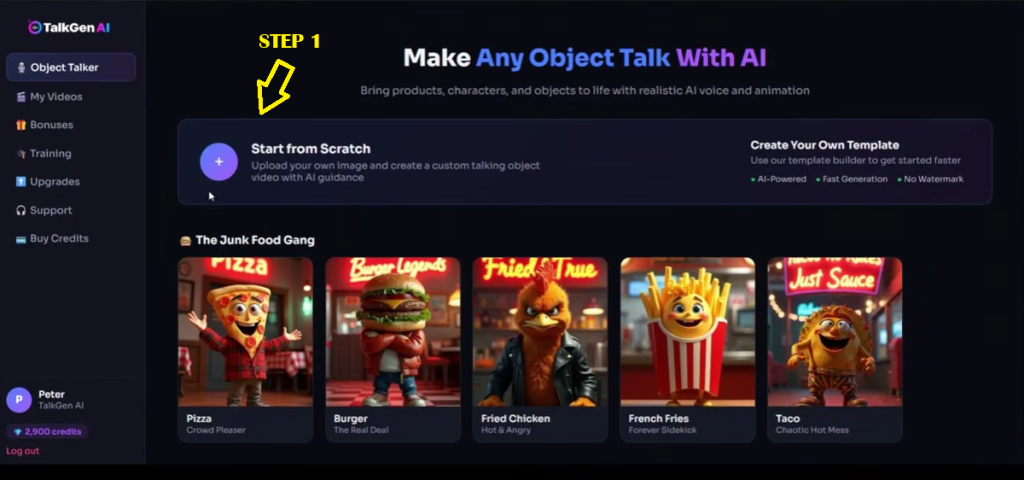
Setup took me less than 5 minutes. No downloads, no installations—just created an account on the TalkGen AI website and I was ready to go. The dashboard is clean and intuitive, with clear navigation to the “Object Talker” feature where all the magic happens.
Creating My First Talking Video
I decided to test TalkGen AI with something simple but fun: a pizza image. The process was straightforward:
Step 1: I uploaded a pizza photo (JPG format, under 10MB).
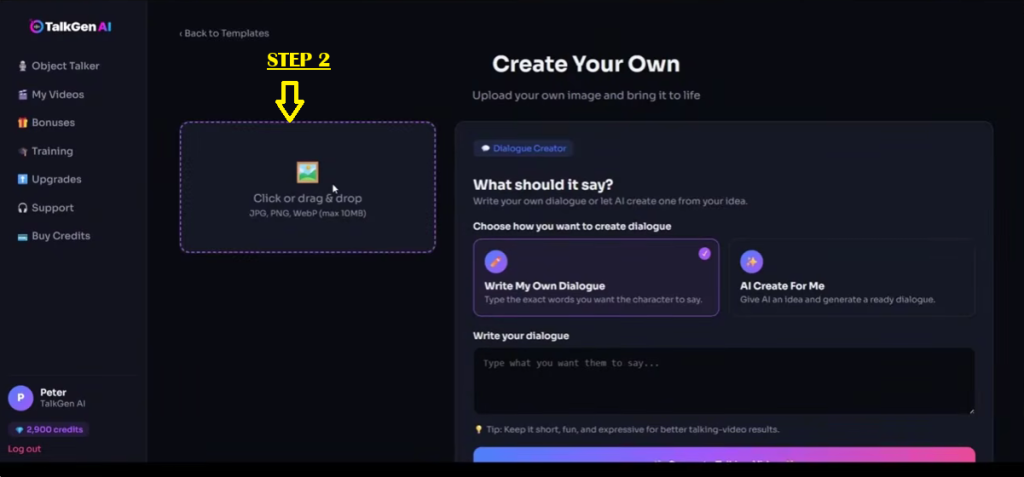
Step 2: I wrote a short dialogue—something playful about being the “best pizza in town.” You can also let the AI write the script for you, which I tried later.
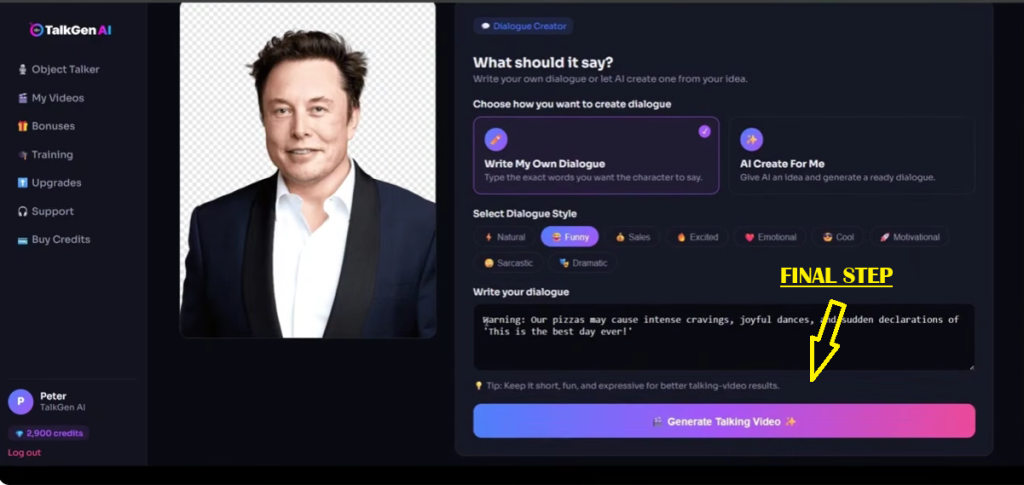
Step 3: I selected a voice style (I chose “Funny”), clicked “Generate Talking Video,” and waited.
Within about 45 seconds, my pizza was talking. The lip-sync was surprisingly good—the mouth movements matched the audio reasonably well. The pizza had subtle animations that made it feel alive, not just a static image with a voiceover.
Testing the AI Script Writer
I also tested the “AI Create For Me” feature. I typed “a motivational sneaker that helps you run faster” and selected the “Motivational” dialogue style. The AI generated a 15-second script that was actually pretty decent—not mind-blowing, but usable for a quick social media post.
The Results
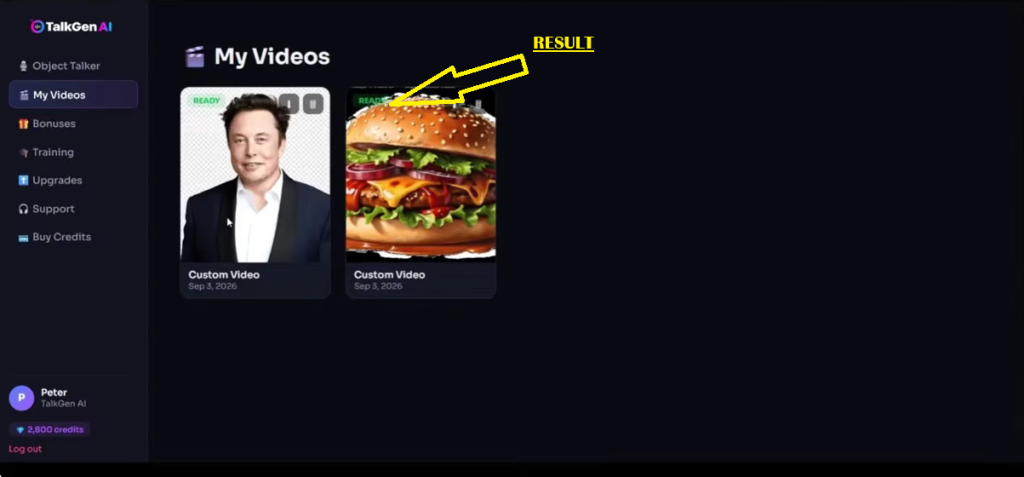
Over three days of testing, I created 12 talking object videos—pizza, burger, sneaker, coffee cup, and a few product images from my own inventory. Each video took between 45-90 seconds to generate.
What I accomplished:
- Created 12 videos in under 3 hours total (including writing scripts)
- Posted 5 of them to Instagram Reels and TikTok
- The “talking burger” video got 2,300+ views on TikTok in 48 hours
- Generated 47 new followers across both platforms
Normally, creating 12 short videos would have taken me at least 2-3 full days of filming and editing. TalkGen AI cut that time by roughly 80%.
Key Features I Tested
1. Object Upload & Image Support
Uploading images is simple—drag and drop or click to select. The tool accepts JPG, PNG, and WebP formats up to 10MB. I tested it with product photos, food images, and even a cartoon character. All worked well, though images with clear, defined shapes produced better results than busy, cluttered photos.
2. Dialogue Creation
You have two options:
- Write My Own Dialogue: Type exactly what you want the character to say. I used this for most of my tests because I wanted specific messaging.
- AI Create For Me: Give the AI a topic or idea, and it generates a script. This is great for inspiration or when you’re stuck for ideas.
[INSERT SCREENSHOT 6: DIALOGUE STYLE SELECTION]
The dialogue styles—Natural, Funny, Sales, Excited, Emotional, Cool, and Motivational—let you set the tone. I found “Funny” and “Excited” worked best for social media content.
3. Voice Selection
With 200+ voices available, I had plenty of options. The voices sound natural, not robotic, and the emotional range is impressive. I tested voices in English, Spanish, and French—all sounded authentic.
4. Video Generation Speed
Most of my videos generated in under 60 seconds, exactly as promised. The fastest was about 38 seconds; the slowest (with a more complex image) took around 75 seconds.
5. Export Options
Videos export in MP4 format with options for vertical (9:16), square (1:1), or horizontal (16:9). This is perfect for different platforms—Instagram Reels, TikTok, YouTube Shorts, or Facebook Ads.
What I Liked (Pros)
1. Ridiculously Easy to Use – The 3-step process is genuinely simple. Upload → Write/Generate Script → Generate Video. No learning curve whatsoever.
2. Fast Results – Getting a finished video in under a minute is a game-changer for content creators who need volume.
3. Great Voice Quality – The AI voices sound natural and engaging. I was impressed by the emotional range and accent options.
4. Commercial License Included – You can sell the videos you create. This opens up a revenue stream for freelancers and agencies.
5. One-Time Payment – No monthly subscriptions eating into your budget. Pay once, use forever.
What I Disliked (Cons)
1. AI-Generated Dialogue Can Be Generic – The AI script writer produces usable content, but it lacks the creativity and punch of a human-written script. I found myself rewriting most AI-generated dialogues.
2. Limited Customization – You can’t fine-tune the lip-sync precision or adjust the object’s animation movements. What you get is what you get.
3. No Advanced Editing Features – This is a “generate and export” tool, not a video editor. If you want to add transitions, effects, or multi-layer editing, you’ll need separate software.
4. Image Quality Matters – Low-resolution or busy images produce less impressive results. The tool works best with clear, high-contrast images.
Who Is This For?
TalkGen AI is best for:
- Social Media Content Creators – If you create Instagram Reels, TikTok videos, or YouTube Shorts, this tool helps you pump out engaging content fast.
- eCommerce Sellers – Turn your product images into talking ads that grab attention.
- Affiliate Marketers – Create promotional videos for products you’re promoting. Pair this with my guides in Traffic & Seo Tools to drive massive views to your new videos.
- Freelancers & Agencies – Offer talking object video services to clients with the commercial license. Want to scale this into a real income stream? Check out my resources in the Make Money Online category.
- Restaurant & Food Brands – Make your menu items talk—it’s fun and shareable.
- Course Creators & Coaches – Add a playful element to your promotional content.
💡 Ready to start creating? [Get instant access to TalkGen AI here] and start making your first talking video in 5 minutes.
Who Should Avoid This?
TalkGen AI isn’t for:
- Professional Video Editors – If you need full control over every frame, this tool is too limited.
- Serious Branding Projects – The “talking object” style is playful and might not suit every brand identity.
- People Who Need Complex Animations – This does one thing well: talking objects. It’s not an animation suite.
- Anyone Expecting Hollywood-Level Quality – The results are impressive for an AI tool but won’t replace a professional studio production.
Competitor Comparison
I’ve used several AI video tools, including HeyGen, Synthesia, and Elai.io. Here’s how TalkGen AI compares:
- ✅Talking Objects
- 200+AI Voices
- 50+Languages
- ✅One‑Time Payment
- ✅Commercial License
- Very EasyEase of Use
- ❌Talking Objects (avatars only)
- 120+AI Voices
- 40+Languages
- ❌Subscription
- ✅Commercial License (paid)
- ModerateEase of Use
- ❌Talking Objects (avatars only)
- 140+AI Voices
- 120+Languages
- ❌Subscription
- ✅Commercial License (paid)
- ModerateEase of Use
Where TalkGen AI wins: It’s the only tool I’ve found that specializes in turning objects into talking characters. Most competitors focus on human avatars. The one-time payment model is also a huge advantage.
Where TalkGen AI falls short: The competitors offer more customization, better avatar quality, and more advanced editing features. If you need professional talking-head videos, those tools are better choices.
My Final Verdict
Would I recommend TalkGen AI? Yes—with some caveats.
If you’re a content creator, marketer, or small business owner who wants to create fun, engaging social media videos quickly and affordably, this tool is a no-brainer. The ease of use, speed, and one-time pricing make it accessible to anyone.
When compared to other tools in the Best AI Tools & Software roundup I’m preparing, TalkGen AI stands out as the absolute best option specifically for talking objects. It fills a unique niche that no other tool quite captures.
My rating: 4.2 out of 5
I deducted points for the generic AI script writing and limited customization. But for the price and what it does, it’s a solid tool that I’ll continue using for my own content.
👉 [Click here to grab your TalkGen AI license at the best price]
🚀 Ready to bring your images to life?
Don’t wait! The early-access pricing and bonuses won’t last forever. Click the button below to grab your copy and start creating engaging talking videos today.
👉 [Click here to grab your TalkGen AI license at the best price]
About the Author
Othman Fadel is the founder of Tool Truth Hub, where he reviews AI tools, software, and digital products as they launch. Based in Morocco, he specializes in affiliate marketing and tracking new product releases across platforms like JVZoo, helping readers cut through the hype with clear, honest breakdowns of what each tool actually offers, who it’s for, and whether it’s worth buying.
Frequently Asked Questions
Is TalkGen AI free?
No, but it offers a one-time payment option with no monthly fees. [Click here to see the current pricing] .
Can I sell videos I create with TalkGen AI?
Yes, the commercial license allows you to sell every video you create.
What file formats does TalkGen AI support for uploads?
JPG, PNG, and WebP formats up to 10MB.
How long does it take to generate a video?
Most videos generate in under 60 seconds.
What languages does TalkGen AI support?
Over 50 global languages.
Do I need video editing skills?
No. The tool handles everything automatically.
Is there a money-back guarantee?
Yes, there’s a 30-day money-back guarantee.